






















Numberblocks Generator













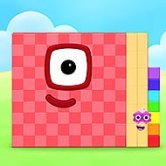
What does 37 look like when a number becomes a character made from visible blocks? Numberblocks Generator turns changing numerical values into a visual activity: the block character grows, shrinks, and changes colour as the number on screen changes. The main mechanic is direct and easy to understand: adjust the value, then observe how its shape and number representation respond. Menus for jumps, exact entry, and number groups make the tool useful for exploring place value, odd and even numbers, primes, and square numbers.
| Type | Interactive number exploration and learning tool |
| Starting value | 0 |
| Value controls | Positive and negative jumps, plus Set for an exact value |
| Learning topics | Place value, parity, prime status, number groups, square numbers |
Changing Values in Numberblocks Generator
The first useful step is to wait until the landscape and the number 0 have appeared. The initial load can take a while because the project contains a large collection of drawings, and pressing controls before the stage is ready may not register. Once the number is visible, open the three-bar menu to find the plus and minus controls. These let you move in small steps or jump by larger amounts, with arrows leading to further pages of values.
Small changes make number structure easier to notice. Move from 9 to 10, then from 99 to 100, and watch how the character changes as a new place-value column appears. Adding 10 to a number keeps its ones digit the same, while adding 100 changes a different place. This is a useful activity for a beginner who is still learning how tens and hundreds relate to the digits on the screen.
Set is the shortcut when you already know which value you want to inspect. Enter the whole number, then enter 0 when prompted for sixtieths if you do not want to add a fractional part. This is faster than pressing +1 repeatedly, especially when comparing values such as 64, 125, or 1,000. The game-like visual feedback makes a mathematical idea easier to discuss because the change is visible rather than abstract.
Number Facts and Clubs in Numberblocks Generator
Clubs groups numbers according to shared properties, such as even numbers, multiples of 5, or primes. Checking why 36 belongs to more groups than 37 can lead to a useful discussion about divisibility. The Number facts panel on the hosted version adds a quick summary of place value, odd or even status, and prime or composite status. These details update with the current value, so you can make a prediction before opening the panel.
Try a short set of comparisons:
- Compare 21 and 23 to distinguish composite and prime numbers.
- Move through 1 to 10 and identify which values are even.
- Inspect 4, 9, 16, and 25 to see square-number arrangements.
- Use +10 to test what happens to the ones digit.
Players who learn best by experimenting can use Set to test their own questions, while a parent or teacher can ask for a prediction before each jump. The most useful habit is to explain why a result appears, not merely name the colour or shape. Very large values may take longer when Clubs checks their properties, so allow the panel to finish rather than clicking repeatedly.
Exploring Large Numbers and Numberblocks Generator Tools
The generator can represent values far beyond the first few counting numbers, reaching into the billions. Larger jumps let you explore thousands and millions without stepping through every value. Watch the digits and the block arrangement together: the visual model can make it easier to see why adding a zero changes the scale of a number. For a learner, that connection between a written numeral and a built shape is often the most memorable part.
The Break it down button connects the current number to a more detailed number tool. That companion view can show factors, block and rectangle pictures, and a printable practice card. The added Number facts panel and Break it down shortcut are features of the hosted version described here; the original number-character idea remains the basis of the activity. This distinction matters if you compare different versions of the generator.
A limitation is that a large visual project can take time to load, and checking properties for very large numbers may also feel slower than changing a small value. That is a practical trade-off for a tool built around many drawings and number relationships. Short sessions with one clear question usually work better than random jumps through the menu.
Questions About Numberblocks Generator
How do you set an exact number?
Open the three-bar menu and choose Set, then enter the whole number you want to inspect. When the prompt asks for sixtieths, enter 0 if you only want the whole-number value, and the block character will update to match.
How can you tell whether a number is prime?
Use the Number facts panel to check the current value’s prime or composite status, then compare it with the Clubs groups. Testing nearby values such as 21 and 23 is useful because 21 has factors beyond 1 and itself, while 23 is prime.
Why does Numberblocks Generator take time to load?
The visual project includes well over a thousand drawings for different numbers, so the initial stage can take time to appear. Wait until the landscape and starting value 0 are visible before using the menu or changing values.
Numberblocks Generator is most effective when each change answers a small question about place value, parity, factors, or shape. Moving from 9 to 10, checking 23 in Clubs, or sending a value through Break it down turns a simple block character into a concrete way to reason about numbers.