




















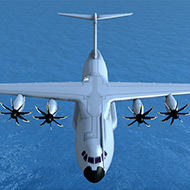
Turboprop Flight Simulator










What happens when you push the tilt-wing lever on the XV-40 too early during a vertical takeoff? Anyone who’s spent time with Turboprop Flight Simulator on a phone or tablet has asked some version of that question, usually right after watching a wing clip the runway and separate from the fuselage mid-roll.
| Genre | 3D aircraft simulator |
| Aircraft Roster | 14 turboprop and VTOL variants |
| Controls | Tilt sensor, virtual stick, or yoke |
| Modes | Training missions, scripted missions, free-flight |
The Aircraft Roster in Turboprop Flight Simulator
The plane list is the first thing that separates this game from lighter mobile flight apps. The C-400 tactical airlifter, styled after the real-world Airbus A400M, anchors the military side of the roster, with the HC-400 coastguard search-and-rescue variant and the MC-400 special-operations version built off the same airframe. On the commercial side, the RL-42 and RL-72 regional airliners take their cues from the ATR-42 and ATR-72, and the E-42 early-warning aircraft is a derivative of the RL-42 with a radically different mission profile.
- XV-40 — a concept tilt-wing VTOL cargo aircraft, with the PV-40 luxury and MV-40 special-operations variants sharing its airframe
- PS-26 and MS-26 — private and special-operations seaplanes built for water landings
- C-130, HC-130, and MC-130 — cargo, coastguard, and special-operations versions inspired by the Lockheed C-130 Hercules
New players almost always gravitate toward the C-130 line first because the flight characteristics are the most forgiving, while the XV-40 tilt-wing family is where most crashes happen early on — rotating the wing assembly too fast during the transition from vertical to forward flight is the single most common way a first attempt ends in a wingtip clip.
Learning the Controls Without a Real Yoke
Turboprop Flight Simulator gives players a genuine choice between a tilt-sensor scheme, an on-screen virtual stick, or a yoke layout, and none of them are set up as the “easy mode.” The full control set — rudder, flaps, spoilers, thrust reversers, auto-brakes, and landing gear — is available from the first training mission, which is unusual restraint for a mobile title that could have hidden half of that behind unlocks.
The training missions exist specifically to walk a new pilot through taxiing, takeoff, and landing before anything harder is attempted, and skipping straight to free-flight without them is the fastest way to end up asking why the C-400 keeps ground-looping on rollout.
Ground Vehicles and Cargo Operations
Beyond flying, players can step out of the cockpit and drive ground vehicles around the airport, load and unload cargo, and airdrop supplies from the C-130 and C-400 families mid-flight. JATO — Jet Assisted Take-Off — is available for short or improvised runways, and it’s one of those mechanics that mobile flight sim communities bring up constantly because it turns an otherwise impossible short-field takeoff into a manageable one, provided it’s triggered at the right airspeed.
Damage Modeling That Doesn’t Pull Punches
One detail that keeps coming up when players compare Turboprop Flight Simulator to other mobile options is the destruction modeling. Wingtip clipping, full wing separation, tail separation, and main fuselage breakage are all simulated individually rather than the game just flashing a generic “crash” screen, which means a rough crosswind landing on the RL-72 might only cost a wingtip while the same mistake in a seaplane touchdown on the PS-26 can end far worse.
Free-Flight and Route Planning
Free-flight mode drops the mission structure entirely and lets a player draw a route across the map’s several islands and airports, then fly it in whatever time-of-day setting they choose. Casual explorers tend to live almost entirely in this mode, while mission-focused players treat it as a warmup before attempting a scripted objective.
What Players Actually Debate About Turboprop Flight Simulator
The most common complaint isn’t the flight model — reviewers consistently rate the physics highly, with an average around 4.6 out of 5 on app stores — it’s that the tilt-wing VTOL aircraft feel genuinely difficult to master on a touchscreen, and some players never fully adapt to transitioning the XV-40 family between hover and forward flight without an external controller. Ads are optional and rewarded rather than forced between flights, which most reviewers consider fair, though a handful still find the interruption timing awkward mid-mission.
- Why does my seaplane keep bouncing on water landings? The PS-26 and MS-26 need a shallower approach angle than the wheeled aircraft — coming in too steep causes the hull to skip rather than settle, which is a common mistake for pilots used to the C-400 or RL-42.
- What does JATO actually do in Turboprop Flight Simulator? Jet Assisted Take-Off adds a short burst of extra thrust for getting heavier aircraft like the C-130 off improvised or short runways, and it’s most useful when triggered right as the aircraft reaches rotation speed rather than from a standstill.
- Is the tilt-wing VTOL harder to fly than the regular turboprops? Yes — the XV-40 family requires managing the wing tilt angle alongside throttle and pitch simultaneously during the hover-to-forward-flight transition, and rushing that transition is the leading cause of wing separation crashes for newer pilots.
Between the JATO launches off a gravel strip, the slow crawl through a tilt-wing transition in the XV-40, and the satisfying thud of the C-130’s landing gear settling onto a proper runway, Turboprop Flight Simulator rewards the kind of patience that separates a simulator from an arcade flyer — and for players willing to put in that patience, it remains one of the more complete mobile options in the genre.