






















DUBHouse











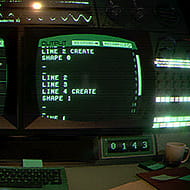
You drag a grainy fight-scene clip into DUBHouse, mark the exact frame where the punch lands, type in who’s speaking, and hit generate. A few seconds later there’s a playable scene sitting in front of you with the original dialogue stripped out and a blank line waiting for your voice. That’s the whole pitch of the game in one motion — you’re not writing jokes into a script, you’re recording over something that already exists.
| Genre | Multiplayer voice dubbing party game |
| Platforms | Windows, macOS, Linux |
| Player Count | Solo or group sessions |
| Core Tool | Clip Maker |
Setting Up a Session in DUBHouse
Every session starts with one person acting as host, and the host is the one whose scene everyone else has to load before anything can be recorded. If you’re playing alone, this barely matters — you drop a clip in, mark it, dub it, done. Once other players are involved, the host becomes the anchor for the whole room, and that role carries a bit more setup than most party games ask for.
The reason for that setup is simple: DUBHouse isn’t routed through a central server the way a lot of browser party games are. Instead, the host’s machine becomes the meeting point, which means everyone else needs a way to reach it directly.
That single design choice shapes almost everything else about how a group session unfolds, from the address you type in to who’s allowed to bring their own scene to the table.
Building a Scene With the Clip Maker
The Clip Maker is where a raw video turns into something playable. You drop in a clip, mark where each line of dialogue starts and stops, name the characters speaking, and the tool builds the scene structure around those marks. It even pulls the original voices out of the track while leaving the music and sound effects intact underneath, so your dub doesn’t play over dead silence.
Beginners tend to mark lines too tightly at first, cutting off the natural breath before a character speaks and making the Record button feel like it’s punishing them for bad timing when really the timing marks were just set wrong. Loosening the mark by even half a second usually fixes it.
- Mark the start of a line slightly before the mouth actually moves
- Leave a small buffer at the end so a delivery doesn’t get clipped
- Name characters consistently so the same voice slot doesn’t reset each round
Recording Lines and Fixing a Fluffed Take
Once a scene exists, recording is just hitting Record and reading against the muted footage. Nobody has to nail it in one pass — if a line comes out wrong, hitting Record again on that same line replaces the fluffed take without touching anyone else’s work in the scene. New scene resets the whole room to a fresh clip, which is the move groups use once they’ve exhausted a clip’s jokes.
What surprises people the first time is how much a bad take can still work. A cracked voice or a mistimed laugh often gets kept on purpose because it fits the ridiculous footage better than a clean read would.
How the Room Comes Together in DUBHouse
When the last player finishes their line, the game mixes every performance into a single video and plays it back for the whole room at once. Nobody has to email files around or wait for someone to render something separately. That shared playback moment is the actual payoff of DUBHouse, and it’s the part streamers lean on hardest, since a room reacting live to a bad dub reads better on camera than the dub itself.
Groups of friends who use the game for casual sketch nights tend to favor short, chaotic clips with several speaking parts, while streamers running it as a segment usually pick longer scenes so there’s more room for a bit to build.
Noise Suppression and Voice Matching Explained
Noise suppression listens to about two seconds of a player’s room before recording starts, learns what a fan hum or PC noise sounds like, and subtracts exactly that instead of guessing at a generic filter. DUBHouse can strip out up to 42 dB of that kind of background noise, which is a meaningful chunk of a typical room’s ambient hum.
Voice matching handles a different problem: the loud friend who’s basically shouting into a gaming headset next to the quiet friend on a laptop mic. Rather than forcing everyone to manually ride their input levels, the game evens both out in the final mixed video so the volume swings don’t ruin playback.
Connecting Guests Across Windows, macOS, and Linux
Since players don’t need to share the same operating system, a host on Windows can run a session with guests on macOS and Linux without anyone needing to match software. The host reads out a 192.168.x.x address shown in-game, everyone joins the same free VPN app — Radmin, Tailscale, or Hamachi are the ones the community mentions most — and that address becomes the shared meeting point. The host has to click through one firewall prompt for it to work, and any guest who’s missing the host’s original scene gets a Download this pack button instead of having to import it manually.
Can DUBHouse be played without a VPN app?
Not in a group setting, since the game routes through the host’s local address rather than a public matchmaking server. A solo player skips this entirely and never touches Radmin, Tailscale, or Hamachi.
How does the noise suppression in DUBHouse actually work?
It samples roughly two seconds of a player’s background sound before recording begins and subtracts that specific noise profile, rather than applying a blanket filter, which is why it can remove up to 42 dB without flattening the voice on top of it.
How do you import a video into the Clip Maker?
You drop the clip into the Clip Maker directly, mark where each line of dialogue begins and ends, assign a name to each speaking character, and the tool assembles a playable scene from those marks automatically.
What keeps people coming back to DUBHouse isn’t the technology under the hood, it’s the fact that a two-second clip and one badly timed Record press can turn into the funniest thing a group watches all week — and once the Clip Maker has done its job, all that’s left is deciding who gets to ruin the scene first.