
















Konbini Cleanup










You pick up a can of melon soda from the middle of the floor, cross the aisle, and slide it into the gap on the drinks shelf where it clicks into place next to eleven identical cans you already sorted. Konbini Cleanup does not tell you this matters, but it does — that one small motion is the entire loop, repeated a few thousand more times before the store looks the way it should.
| Genre | Cozy organizing simulator |
| Release Date | August 14, 2026 |
| Developer / Publisher | Cleanup Crew! |
| Platform | Windows (Steam) |
| Products to Sort | 2,928 |
| Sections | 15+ |
What the Konbini Actually Looks Like on Day One
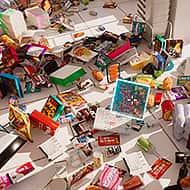
The store you walk into at the start is not lightly messy. Drinks are mixed in with candy, magazines are scattered across the floor near the register, and the onigiri rack sits half empty while its contents are somewhere else entirely. This is the baseline state Konbini Cleanup wants you to internalize before it starts introducing upgrades — chaos first, tools second.
New players tend to treat every item as equal, grabbing whatever is closest instead of clearing a full section before moving on. That instinct slows you down badly once you’re a few hundred items in, because you end up crossing the same aisle five or six times instead of once. The players who settle in fastest treat each section — chips, noodles, drinks — as its own small project with a start and a finish, rather than working the whole floor at once.
There’s a specific kind of player this game rewards: the completionist who can’t stand seeing a shelf 80% full with three empty slots. If that’s you, the noodle aisle in particular will test your patience, since its packaging is easy to confuse under time pressure — except there isn’t any. No timers and no game over means the only pressure is the one you bring with you.
Movement Speed, Reach, and the Wall-Clip Ability
As you clear sections, Konbini Cleanup hands out upgrades rather than new obstacles. Movement speed and reach are the two most immediately useful — reach in particular cuts down on the fiddly repositioning needed to place items on higher shelves. Neither upgrade changes what you’re doing, only how much friction is between you and doing it.
The upgrade players talk about most is the one that lets you pass through walls. It’s mostly a convenience for cutting corners around the store layout, but it’s also tied to an achievement that sends you into the void outside the playable space — a small, deliberately odd reward for players who go looking for the edges of the map instead of just finishing the job in front of them.
Speedrunners exist even in a genre built around having no clock, and they’ve found this ability useful for skipping the standard walking routes between sections entirely.
Sorting Without Losing the Thread at 2,928 Items
The number that gets repeated constantly in discussions of the game is 2,928 — the total product count across the store. That figure matters less as a bragging point and more as a design constraint: it’s large enough that sorting has real texture instead of the same twenty objects on loop, but Cleanup Crew! clearly built the difficulty curve around never letting that scale become punishing.
Community vocabulary has already settled around calling a fully finished section a “clean shelf,” and players compare notes on which sections clear fastest versus which ones drag. Drinks tends to go quickly because cans are visually distinct at a glance; the magazine stand is the one people mention as the slow point, since a messy stack takes longer to straighten into something that reads as tidy.
By the time you’ve cleared roughly half the store, the layout of sections starts to feel memorized rather than searched for, and that’s when the pace genuinely picks up — not because the game speeds anything up for you, but because you do.
What DX11 Mode Changes If You’re Crashing
If Konbini Cleanup crashes on launch, switching the render option to DX11 from the startup prompt is the documented fix, though early on it made lighting look noticeably worse. That’s been improved since, and it’s worth trying before assuming the whole install is broken.
Do Difficulty Settings Do Anything Here?
There isn’t a difficulty setting in the traditional sense — no scoring, no fail state, no countdown. The only variable is how fast you personally choose to move through a section, which for a cozy title is exactly the point rather than an omission.
Long-Tail Questions Players Actually Ask
How long does it take to finish sorting the entire store?
There’s no built-in timer tracking this, but most players describe several hours of steady play to clear all 15+ sections, depending heavily on whether they’re rushing sections or double-checking placement as a completionist would.
What happens after you finish sorting everything?
Once every section is cleared, there’s no forced next objective layered on top — the loop is the content, and finishing it is the stated goal rather than a gateway to something else.
Is the wall-clipping ability worth using early?
It’s mostly useful once you already know the store layout well enough to benefit from cutting through walls instead of walking around them, so most players unlock and enjoy it more in the back half of a playthrough than at the very start.
What keeps people coming back to Konbini Cleanup isn’t a twist mechanic or a hidden system — it’s the specific, small satisfaction of watching the onigiri rack go from scattered to full rows, one can of melon soda and one messy stack of magazines at a time.