










Tiny Brutalism





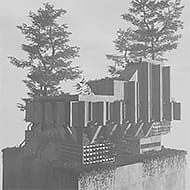
What does a cozy game look like when the thing you are building is a concrete tower? Tiny Brutalism answers with a quiet black-and-white sandbox where you stack slabs, slopes, and windows into monuments that feel more like a mood than a place. There is no goal, no timer, and no right way to build, just you and a very large wall.
| Genre | Cozy sandbox building |
| Platforms | Windows, macOS, Linux |
| Players | Singleplayer |
| Art style | Black and white brutalism |
| Goal | None, build whatever you like |
Click, Hold, and Flip Through Variants in Tiny Brutalism
The building system is built around a few simple controls. A single click places a block, holding the button fills an area, and shift plus click removes what you placed. Scrolling while you hold lets you flip through variants of a block, and undo is always available when a tower leans the wrong way.
- Click: build, or click and hold to fill an area.
- Shift and click: remove a block.
- Hold and scroll: flip through variants.
- Ctrl or Cmd and Z: undo.
- Sun icon: switch between day and night.
Beginners often assume the game places random blocks and let it run on its own. That randomness was the early approach, and while the creator has added more control since, learning the variant scroll is what lets you shape a structure instead of nudging it.
Players who love architecture will enjoy deciding how heavy or open a facade feels, while casual builders can simply hold and drag to cover a whole plot in concrete.
Plot Size, Slopes, Windows, and Cables
The Esc menu holds settings and plot size, and the plot can now be resized up to 16 by 16, a big step up from the original smaller lot. Slopes, windows, and cables give the structure variety, although several players admit it took them a few sessions to notice what windows actually did. A quick first session might go like this:
- Open the Esc menu and choose your plot size.
- Click and hold to fill a base layer of concrete.
- Scroll through variants to add slopes, windows, and cables.
- Orbit the camera with a right drag and check the shape from every side.
- Toggle the sun icon to see how your tower looks at night.
The night view adds a star sky and glowing windows, which can turn an ordinary stack of slabs into something moody. It is also the moment players tend to take photos, which are saved locally and can be opened from the settings folder.
Where Tiny Brutalism Frustrates Players
The loudest complaint is control. Players asked for more say over which blocks appear, and many mention that zoom scrolling feels slow. Others could not find the camera moves at first, since orbit is a right drag, pan is a middle drag, and zoom is the scroll wheel.
Early sessions were also short because the smaller plot offered only a few minutes of building. The creator responded quickly with bigger plots and more building tools, but some players still want even larger lots, more lights, and weather options to cut down the fog.
Performance is another note. At least one player reported their graphics card working hard, which suggests the game could use a frame rate limit. The most requested addition is model export, so builders can bring finished towers into other projects.
What Players Build and Share
The community has turned a small sandbox into a creative spark. People post screenshots of towers and monuments, one designer made a poster from their build, and a musician asked about using edited screenshots as album art. Others hope to import their structures into a parkour game so they can jump around inside them.
That kind of reuse works because the visual style is so strong. Black-and-white concrete, harsh shadows, and impossible geometry look good from nearly any angle, and builders who love brutalism find it scratches a very specific itch.
Questions Players Ask Before Their First Build
Does Tiny Brutalism have a goal?
No. The game is about making strange monuments, concrete towers, or just a really big wall, with no objectives or scoring. You decide when a structure is finished and when to start another one.
How do you rotate the camera in Tiny Brutalism?
Hold the right mouse button and drag to orbit the camera. Use a middle drag to pan and the scroll wheel to zoom, which solves the most common early confusion about where the camera controls are hiding.
Can you change the plot size in Tiny Brutalism?
Yes. Open the Esc menu and look for plot size in the settings, where you can enlarge the lot up to 16 by 16. A bigger plot gives your towers and walls much more room to grow.
Tiny Brutalism is at its best when you stop looking for objectives and start stacking slabs. Learn the variant scroll, try the slopes and cables, flip the sun icon to night, and let a plain concrete plot become a monument of your own.